Reading a laptop spec sheet: processor, memory, storage, ports
Laptop spec sheets list processor model, RAM type and capacity, storage type and size, and port capabilities. Buyers can use standards from USB, NVMe, and Bluetooth to compare these numbers. This article explains what each specification means and how to check it.
-USB-C_port_large_PNr%C2%B00761.jpg)
Processor and memory
A processor specification typically includes the manufacturer, model number, number of cores, base clock speed, and cache size. The model number often indicates the generation and performance tier. For example, a higher number in the same product line usually means a newer or faster chip. The ENERGY STAR computer criteria let shoppers filter models by processor speed and memory, which helps narrow choices based on computing needs.
Memory, or RAM, is listed as a type, such as DDR4 or DDR5, and a capacity in gigabytes. The type indicates the generation and compatibility with the motherboard, while the capacity shows how many applications can run simultaneously. More memory allows for more open applications and smoother multitasking. Check whether the memory is soldered or upgradeable, as this affects future expansion.
When reading a spec sheet, consider the balance between processor and memory. A fast processor with insufficient memory can bottleneck performance, while ample memory with a weak processor may not deliver expected speeds. The right combination depends on the intended use, such as office work, creative tasks, or programming. For practical guidance, a roundup like programming laptops can show how these specifications translate into real-world performance.
Storage
Storage specifications describe the drive type and capacity. Common types include hard disk drives (HDDs) and solid state drives (SSDs). SSDs are faster and more reliable, while HDDs offer larger capacities at lower cost. The NVM Express specifications define how host software communicates with non-volatile memory over transports like PCIe, which is the standard for modern SSDs.
SSDs often use the NVMe protocol, which allows faster data transfer than older SATA-based SSDs. NVMe drives come in various form factors. The spec sheet may list the interface, such as PCIe, which affects maximum throughput. Capacity is expressed in gigabytes or terabytes, and the usable space is slightly less after formatting.
For most users, an NVMe SSD is recommended for the operating system and applications, with an optional HDD for bulk storage. The spec sheet might also indicate whether additional storage slots are available.
Ports and power
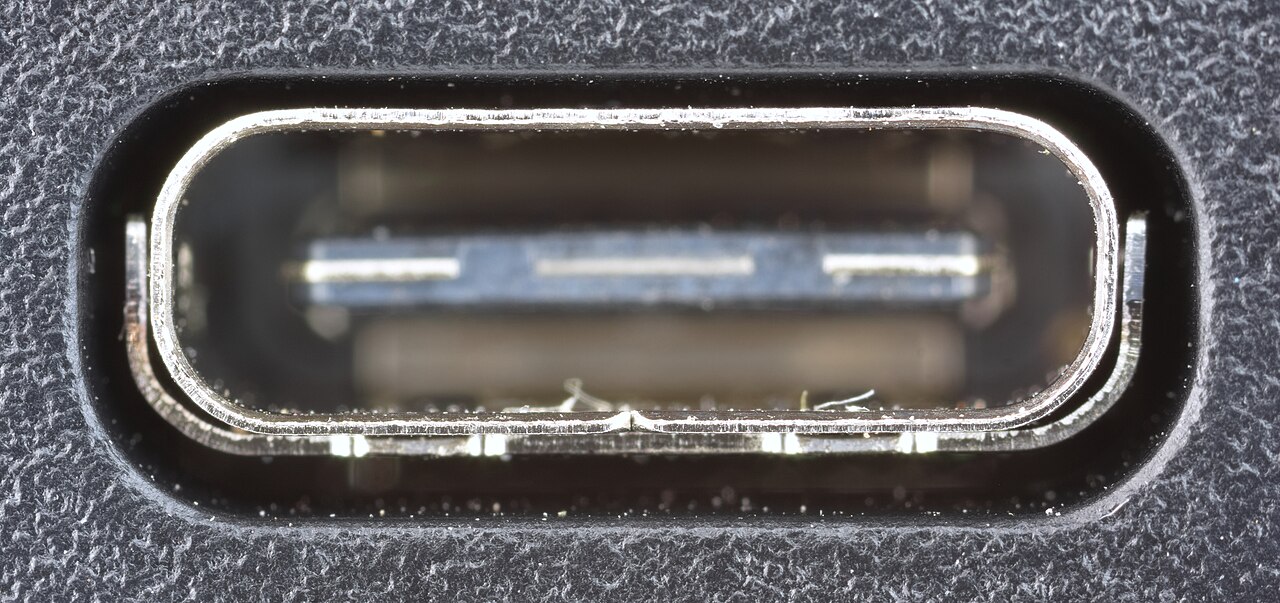
Port specifications list the types and number of connectors, such as USB-A, USB-C, HDMI, and Ethernet. USB-C is increasingly common because it supports data, display, and power. The USB-IF USB4 specification explains that USB4 doubles the maximum aggregate bandwidth of USB and supports multiple simultaneous data and display protocols over one high-speed link.
USB Power Delivery (USB PD) enables higher power over a single cable. According to the USB Power Delivery specification, USB PD can deliver up to 240W over a full-featured USB Type-C cable, allowing laptops to charge from a USB-C port. This feature is listed as the maximum power output or charging capability.
Thunderbolt ports are compatible with USB-C and offer higher bandwidth, often used for docking stations or external GPUs. A spec sheet may indicate Thunderbolt support alongside USB4. Check the port markings or the manufacturer's description for this detail.
Wireless connectivity
Wireless specifications include Wi-Fi standards and Bluetooth versions. Bluetooth comes in two radio types: Classic and Low Energy (LE). The Bluetooth SIG technology overview states that Classic uses 79 channels in the 2.4 GHz band, while LE uses 40 channels. Classic is typically for audio streaming, while LE is for low-power device communication.
The Bluetooth version number indicates the generation and feature set, with newer versions often bringing improvements in range, speed, or security. Wi-Fi standards, such as Wi-Fi 6 or Wi-Fi 6E, affect wireless network speed and band support. These are listed in the spec sheet as 'Wi-Fi 6' or '802.11ax'.
When comparing laptops, consider the wireless features that match the user's environment, such as dual-band Wi-Fi or support for mesh networks. The spec sheet also lists Bluetooth version, which is important for peripherals like mice, keyboards, and headphones.
| Feature | Bluetooth Classic | Bluetooth LE |
|---|---|---|
| Frequency band | 2.4 GHz ISM | 2.4 GHz ISM |
| Channels | 79 channels with 1 MHz spacing | 40 channels with 2 MHz spacing |
| Communication topologies | Point-to-point | Point-to-point, broadcast, mesh |
| Maximum data rate | 3 Mb/s (EDR) | 2 Mb/s (LE 2M PHY) |
Frequently asked questions
What does USB4 mean?
USB4 is a specification that builds on Thunderbolt, doubling the maximum aggregate bandwidth of USB and enabling up to 80 Gbps with certified cables, according to the USB-IF.
What is NVMe?
NVMe is an industry standard for solid state drives that defines how host software communicates with non-volatile memory over PCIe, as described by the NVM Express organization.
How can a laptop charge through USB-C?
With USB Power Delivery, a USB-C cable can deliver up to 240W of power, allowing laptops to charge and even power external devices.
What is the difference between Bluetooth Classic and Bluetooth LE?
Bluetooth Classic is designed for continuous data streaming like audio, while Bluetooth LE is optimized for low-power operations and supports mesh networking.