Keyboard ergonomics and layout choices
Keyboard ergonomics aims to keep wrists straight and elbows close to the body. Choosing a shorter or split keyboard and using a tilt adjuster can reduce strain. Regular breaks from typing are also recommended.
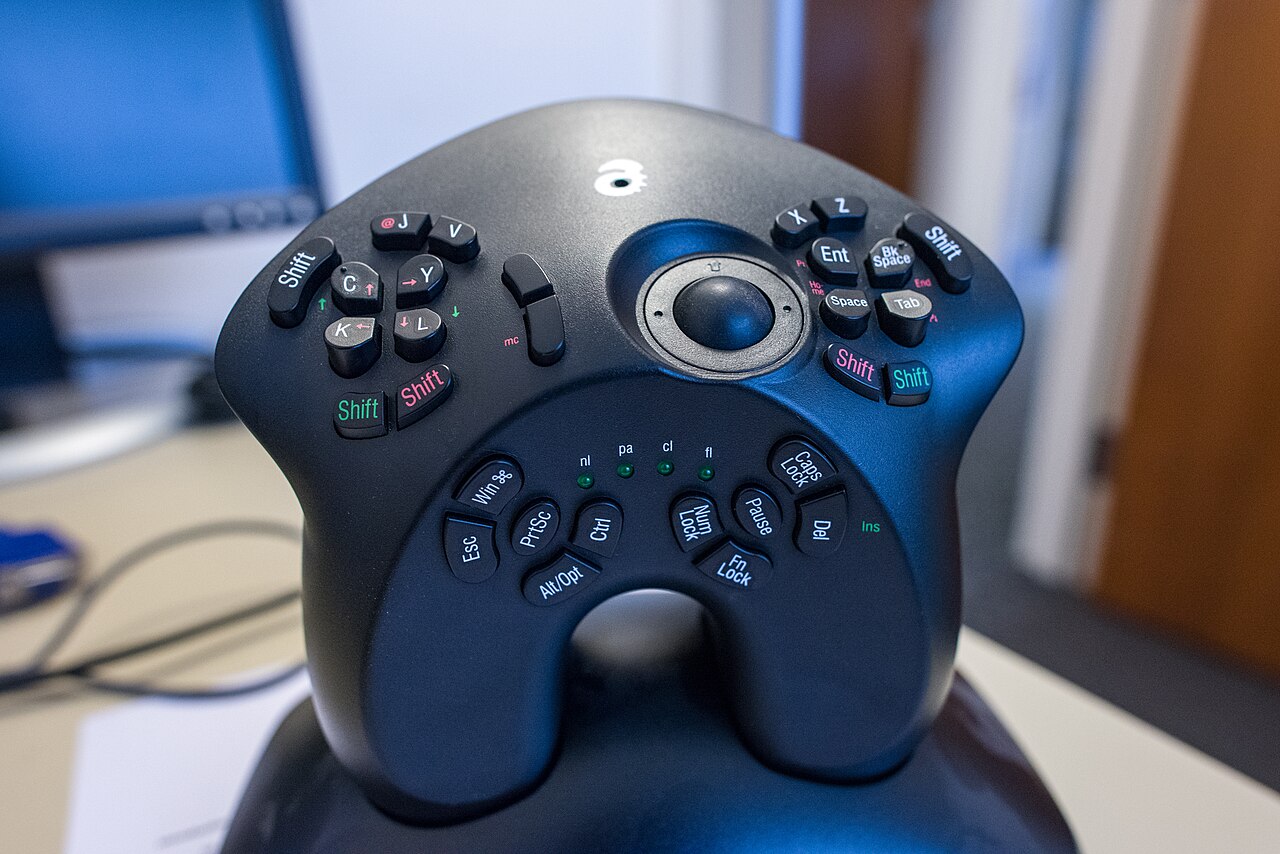
.jpg)
Neutral posture and placement
The OSHA keyboard guide explains that wrists should be straight and in line with the forearms, with shoulders relaxed and elbows close to the body. This neutral position helps avoid awkward postures that can lead to discomfort.
The OSHA computer workstation eTool illustrates a balanced whole-body setup: the head and neck stay in line with the torso, the lower back is supported, and the feet rest flat. The keyboard should be placed directly in front of the user at a distance that keeps the forearms roughly parallel to the floor.
Keyboard design choices
The CCOHS keyboard selection page suggests trying different models to find the one that allows a neutral wrist position. A shorter keyboard, about 14 inches long, reduces the need to overreach compared to a regular 18-inch model.
For users with a broad chest or pain on the side of the wrist opposite the thumb, a split keyboard can help align the arms and wrists. A tented keyboard, which raises the center, may benefit those with forearm conditions by easing the arm angle.
The CCOHS page also notes that left-handed users might prefer a keyboard with the numeric pad on the left or a separate numeric pad.
Adjustments and accessories
The HSE guidance on display screen equipment reminds that incorrect use or poorly designed workstations can cause pain in the neck, shoulders, arms, wrists, and hands. Employers must assess workstations and ensure workers take breaks from continuous DSE work.
To reach a neutral wrist posture, the keyboard height and tilt may need adjustment. A keyboard tray with adjustable height and tilt provides leg clearance and room for multiple input devices when the desk or chair cannot be changed.
Wireless keyboards and Bluetooth
Bluetooth technology provides a wireless link between keyboards and computers, using the 2.4 GHz ISM band. The Bluetooth Classic radio supports point-to-point data transfer, which is how many wireless peripherals connect.
A wireless keyboard removes the cable from the desk and lets the user position it freely. When choosing a wireless model, it is useful to compare layout options and key switches. The keyboard reference offers details on mechanical, wireless, and compact designs.
| Feature | Purpose | Recommended use |
|---|---|---|
| Split keyboard | Reduces ulnar deviation by separating the two halves | May suit users with a broad chest or wrist pain |
| Tented keyboard | Elevates the center to achieve a neutral arm position | Recommended for those with forearm tendon conditions |
| Shorter keyboard | About 14 inches long, reduces overreaching | Provides more space for the mouse |
| Keyboard tray | Adjustable height and tilt | Adds leg clearance and room for multiple devices |
| Tilt adjustment | Raises the front or back of the keyboard | Helps maintain straight wrists |
Frequently asked questions
What is a neutral wrist position?
A neutral wrist position means the wrist is straight and in line with the forearm, not bent up, down, or to either side.
Should a user use a split keyboard?
A split keyboard can help reduce ulnar deviation, especially for users with a broad chest or pain on the side of the wrist opposite the thumb.
How often should a user take breaks from typing?
Health and safety guidance recommends taking short breaks from continuous display screen equipment work to let muscles recover.
Can a keyboard tray help?
A keyboard tray with adjustable height and tilt can position the keyboard correctly if the desk or chair cannot be adjusted.
What is the benefit of a shorter keyboard?
A shorter keyboard reduces the need to overreach and leaves more room for the mouse to sit close to the body.